
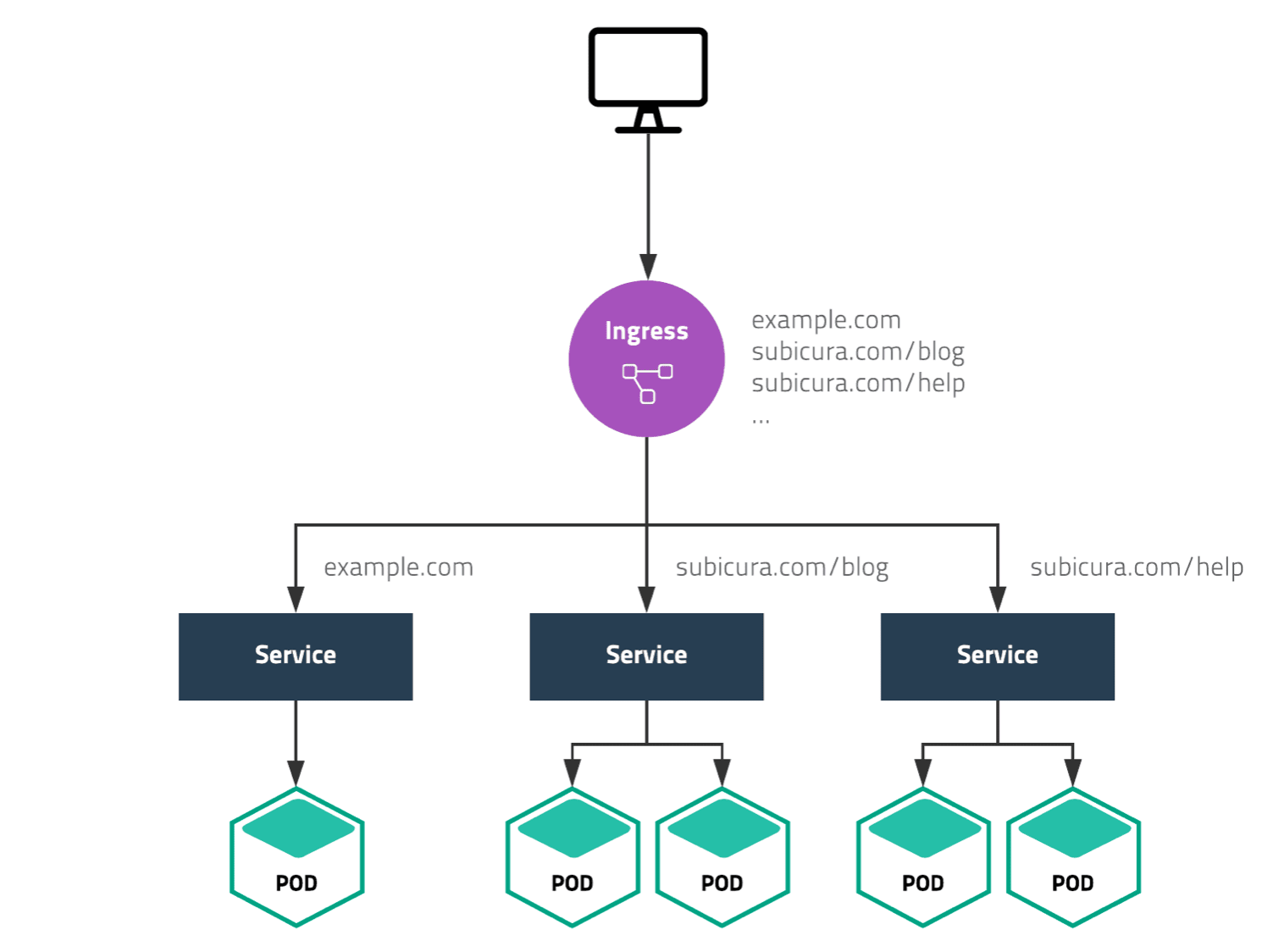
Ingress Controller가 Harbor Service를 “어떻게 찾아서 전달하는지”를 이해하면 전체 구조가 완성됩니다.
📘 3.7단계 - Ingress Controller → Harbor Service 연동 구조
핵심부터 말하면:
Ingress Controller는 Ingress 리소스의 규칙을 보고, 해당 Host/Path 요청을 지정된 Harbor Service로 전달합니다.
즉 연결 고리는 이겁니다.
Ingress Resource
        ↓
Host / Path 규칙
        ↓
Harbor Service
        ↓
Harbor Pod
1. 먼저 전체 흐름
사용자가 접속합니다.
https://harbor-prod.company.com
흐름은:
사용자
  ↓
DNS
  ↓
F5 VIP
  ↓
Ingress Controller
  ↓
Ingress Resource 규칙 확인
  ↓
Harbor Service
  ↓
Harbor Pod
여기서 Ingress Controller가 Harbor Service 이름을 직접 하드코딩해서 아는 게 아닙니다.
Kubernetes 안에 있는 Ingress 객체를 계속 감시하고 있습니다.
2. Ingress Resource란?
예를 들어 Harbor용 Ingress를 이렇게 만들 수 있습니다.
apiVersion: networking.k8s.io/v1
kind: Ingress
metadata:
  name: harbor-ingress
  namespace: harbor
spec:
  ingressClassName: nginx
  rules:
    - host: harbor-prod.company.com
      http:
        paths:
          - path: /
            pathType: Prefix
            backend:
              service:
                name: harbor-core
                port:
                  number: 80
여기서 핵심은 이 부분입니다.
host: harbor-prod.company.com
그리고:
service:
  name: harbor-core
  port:
    number: 80
입니다.
뜻은:
harbor-prod.company.com으로 들어온 요청은 harbor-core Service의 80번 포트로 보내라.
입니다.
3. Ingress Controller는 이걸 어떻게 아나?
NGINX Ingress Controller는 Kubernetes API Server를 계속 감시합니다.
예:
Ingress Controller
      │
      ↓
Kubernetes API Server
      │
      ├─ Ingress
      ├─ Service
      └─ EndpointSlice
새 Ingress가 생기면:
harbor-prod.company.com
      ↓
harbor-core:80
규칙을 읽습니다.
그리고 내부적으로 NGINX 설정을 갱신합니다.
개념적으로는:
server_name harbor-prod.company.com;

location / {
    proxy_pass http://harbor-core;
}
와 비슷한 동작을 합니다.
실제 구현은 더 복잡하지만 초보 단계에서는 이렇게 이해하면 충분합니다.
4. 그럼 Service는 Pod를 어떻게 찾나?
Harbor Service가 있습니다.
예:
apiVersion: v1
kind: Service
metadata:
  name: harbor-core
  namespace: harbor
spec:
  selector:
    app: harbor
    component: core
  ports:
    - port: 80
      targetPort: 8080
이 Service는:
app=harbor
component=core
Label을 가진 Pod를 찾습니다.
예:
harbor-core-abc123
  app=harbor
  component=core
그러면:
Service
harbor-core:80
     ↓
Pod
10.244.2.15:8080
로 연결됩니다.
5. 전체 연결을 한 번에 보면
[Client]

https://harbor-prod.company.com
          │
          ↓
        DNS
          │
          ↓
       F5 VIP
          │
          ↓
Ingress Controller
          │
          │ Ingress Rule 확인
          ↓
host:
harbor-prod.company.com
          │
          ↓
Service:
harbor-core:80
          │
          ↓
EndpointSlice
          │
          ↓
harbor-core Pod
10.244.2.15:8080
입니다.
6. 중요한 점: Harbor는 Service가 하나만 있는 게 아닙니다
Harbor는 여러 컴포넌트가 있죠.
예:
harbor-core
harbor-portal
harbor-registry
harbor-jobservice
harbor-trivy
각각 Service가 따로 있을 수 있습니다.
예:
harbor-core
harbor-portal
harbor-registry
하지만 외부 요청을 어떤 Service로 보낼지는 Harbor Helm Chart와 Ingress 구성에 따라 정해집니다.
예를 들어 Browser UI 요청과 Registry API 요청은 내부적으로 다른 Harbor 컴포넌트로 라우팅될 수 있습니다.
7. Docker Push/Pull은 조금 더 재밌습니다
예를 들어:
docker push harbor-prod.company.com/project01/app:v1
을 실행했다고 해보겠습니다.
Docker Client는 Harbor Registry API를 사용합니다.
대표적으로:
/v2/
경로를 사용합니다.
즉 요청:
https://harbor-prod.company.com/v2/
가 들어옵니다.
Ingress Controller는 Host와 Path를 보고 적절한 Harbor Backend로 전달합니다.
개념적으로:
harbor-prod.company.com
        │
        ├─ /              → Harbor Portal/Core
        │
        └─ /v2/           → Harbor Registry 관련 경로
처럼 동작합니다.
Harbor Helm Chart가 이 라우팅 구성을 자동으로 만들어주는 경우가 많습니다.
8. Browser 접속과 Docker 접속 비교
웹 브라우저
https://harbor-prod.company.com
흐름:
Browser
 ↓
Ingress
 ↓
Portal/Core
Docker Push
docker push harbor-prod.company.com/project/app:v1
흐름:
Docker Client
 ↓
Ingress
 ↓
Registry API
 ↓
Harbor Registry
 ↓
Storage
즉 같은 도메인을 사용해도 요청 경로에 따라 Harbor 내부 컴포넌트가 달라질 수 있습니다.
9. Harbor Helm 설치 시에는 보통 자동 생성
Harbor를 Helm으로 설치하면 보통 values.yaml에서 expose 방식을 지정합니다.
예:
expose:
  type: ingress

  ingress:
    hosts:
      core: harbor-prod.company.com
그러면 Helm Chart가:
Ingress
Service
Deployment
Secret
등을 생성합니다.
즉 사용자가 직접 모든 YAML을 처음부터 만들 필요는 없습니다.
10. 실제 확인 명령어
Ingress 확인:
kubectl get ingress -n harbor
예:
NAME             CLASS   HOSTS
harbor-ingress   nginx   harbor-prod.company.com
자세히 보기:
kubectl describe ingress harbor-ingress -n harbor
여기서 이런 정보를 볼 수 있습니다.
Host
harbor-prod.company.com

Path
/

Backend
harbor-core:80
11. Harbor Service 확인
kubectl get svc -n harbor
예:
NAME                TYPE        PORT
harbor-core         ClusterIP   80
harbor-portal       ClusterIP   80
harbor-registry     ClusterIP   5000
harbor-jobservice   ClusterIP   80
여기서 ClusterIP는 Kubernetes 내부에서만 사용하는 IP입니다.
예:
harbor-core
10.96.12.30:80
12. Service 뒤의 Pod 확인
요즘 Kubernetes에서는 EndpointSlice를 많이 사용합니다.
확인:
kubectl get endpointslice -n harbor
또는:
kubectl get endpoints -n harbor
예:
harbor-core
10.244.2.15:8080
10.244.3.21:8080
즉:
Service
harbor-core:80

    ↓

Pod A
10.244.2.15:8080

Pod B
10.244.3.21:8080
입니다.
13. 그래서 Pod가 바뀌어도 Service는 그대로
예를 들어:
Pod A
10.244.2.15
가 죽었습니다.
새 Pod:
Pod C
10.244.5.33
가 생성됩니다.
Service는 자동으로 Endpoint를 갱신합니다.
기존

harbor-core Service
 ├─ 10.244.2.15
 └─ 10.244.3.21
이후:
변경

harbor-core Service
 ├─ 10.244.3.21
 └─ 10.244.5.33
Ingress Controller는 계속:
harbor-core Service
만 바라보면 됩니다.
그래서 Pod IP가 바뀌어도 문제가 없습니다.
14. Ingress Controller가 Service IP로 보내나?
개념적으로는 Service를 Backend로 사용합니다.
하지만 실제 NGINX Ingress Controller 구현에서는 Service 뒤의 Endpoint Pod IP를 직접 읽어 NGINX upstream으로 구성하는 방식도 사용됩니다.
즉 개념은:
Ingress
 ↓
Service
 ↓
Pod
이지만 내부적으로는:
Ingress Controller
 ↓
Kubernetes API
 ↓
EndpointSlice 확인
 ↓
Pod IP로 직접 전달
할 수도 있습니다.
초보 단계에서는:
Ingress는 Service를 기준으로 정의하고, Controller가 Service/Endpoint 정보를 읽어서 실제 Pod까지 전달한다.
라고 이해하면 정확합니다.
15. F5와 Ingress Controller의 역할 차이
이것도 많이 헷갈립니다.
F5
주로:
어느 Ingress Node로 보낼까?
를 결정합니다.
예:
F5
 ↓
Ingress Node01
or
Ingress Node02
Ingress Controller
주로:
이 요청은 어느 Kubernetes Service로 보낼까?
를 결정합니다.
예:
harbor-prod.company.com
        ↓
harbor-core Service
입니다.
16. 아주 쉽게 2단계 라우팅
외부 라우팅:
F5

VIP
 ↓
Ingress Node
Kubernetes 내부 라우팅:
Ingress Controller

Host/Path
 ↓
Service
 ↓
Pod
즉:
F5
= 어느 Node?

Ingress
= 어느 Service?

Service
= 어느 Pod?
이렇게 외우면 정말 쉽습니다.
17. Harbor 기준 최종 흐름
사용자
docker login
docker push
Browser
   │
   ↓
harbor-prod.company.com
   │
   ↓
DNS
   │
   ↓
F5 VIP
10.10.10.100:443
   │
   ↓
Ingress Node
10.10.1.21:30443
   │
   ↓
NGINX Ingress Controller
   │
   │ Ingress Rule 확인
   ↓
harbor-prod.company.com
   │
   ├─ UI/API 요청
   │      ↓
   │   Harbor Core / Portal Service
   │
   └─ Registry /v2/ 요청
          ↓
      Harbor Registry Service
          ↓
      Harbor Registry Pod
          ↓
          PVC
          ↓
       Storage
18. 여기서 Harbor Replication까지 연결하면
Push Replication은 반대 방향의 Outbound 통신입니다.
외부 사용자의 접속:
외부
 ↓
F5
 ↓
Ingress
 ↓
Harbor
Replication Push:
Harbor JobService
 ↓
Network
 ↓
DR Harbor F5/VIP
 ↓
DR Ingress
 ↓
DR Registry
즉 DR Harbor도 동일하게:
harbor-dr.company.com
       ↓
F5 VIP
       ↓
Ingress Controller
       ↓
Harbor Service
       ↓
Registry
구조를 가지고 있다고 보면 됩니다.
⭐ 최종 핵심
딱 이 네 줄을 기억하시면 됩니다.
F5
→ 어느 Ingress Node로 보낼지 결정

Ingress Controller
→ Host/Path를 보고 어느 Service로 보낼지 결정

Service
→ Label/Endpoint를 보고 어느 Pod로 보낼지 결정

Pod
→ 실제 Harbor 기능 수행
그래서 전체는:
Client
 ↓
F5
 ↓
Ingress Controller
 ↓
Ingress Rule
 ↓
Harbor Service
 ↓
Harbor Pod
입니다.
그리고 Ingress Resource가 바로 Ingress Controller와 Harbor Service를 연결해주는 핵심 설정 파일입니다.


댓글