kubectl apply -f gpu-pod.yaml
kubectl get pod
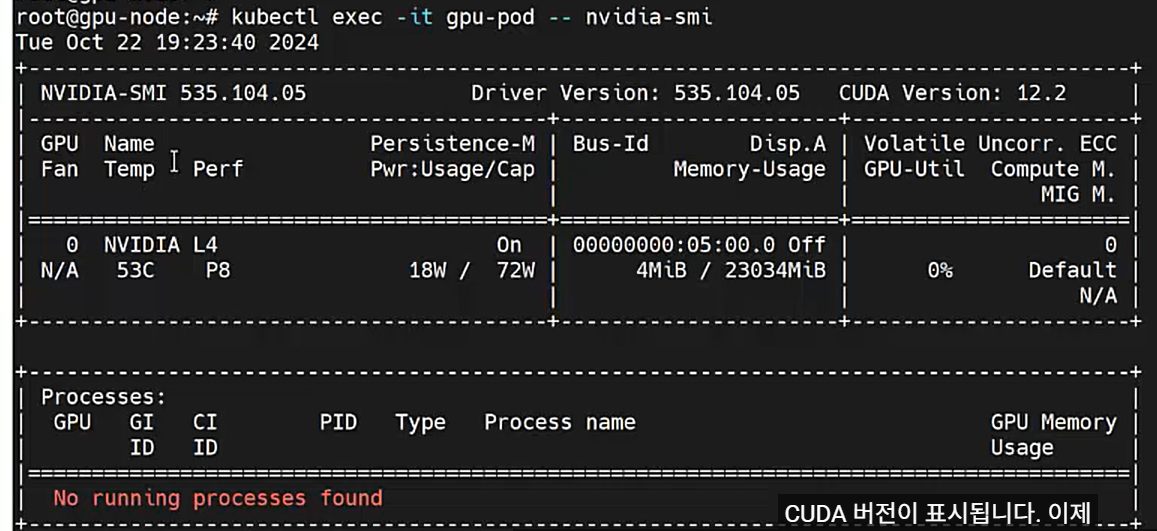
kubectl exec -it gpu-pod -- nvidia-smi
(CUDA 버전 표시)
## GPU 오퍼레이터 확인
kubectl get node
kubectl get pod -n gpu-operator

## GPU 워커노드 확인
kubectl describe node gpu-node | grep -i gpu.present

## Client 서버 접속
docker build -t image_apache .
cat Dockerfile
docker image
docker run -tid -p 4000:80 --name=hello_apache image_apache
docker container ls
docker login nks-reg-real.kr.ncr.ntruss.com
docker image tag image_apache nks-reg-real.kr.ncr.ntruss.com/image_apache:1.0
docker push nks-reg-real.kr.ncr.ntruss.com/image_apache:1.0
ncp-iam-authenticator create-kubeconfig --region KR --clusterUuid ~~
kubeconfig.yml 파일 생성
kubectl get namespaces --kubeconfig kubeconfig.yml
## 쿠버네티스와 NCP Container Register 연동작업
kubectl --kubeconfig kubeconfig.yml create secret docker-registry regcred --docker-server=내부URL ~~
kubectl --kubeconfig /root/kubeconfig.yml create -f create_only_pod.yaml
kubectl --kubeconfig /root/kubeconfig.yml create -f create_deployment.yaml
kubectl --kubeconfig /root/kubeconfig.yml create -f create_service.yaml
10️⃣ 운영 체크 명령어
kubectl get nodes --show-labels | grep gpu.model
# 실제 배치 확인
kubectl get pod -n ml -o wide
# GPU 모델 확인
kubectl exec tf-mnist-train-worker-0 -- nvidia-smi -L
6️⃣ 검증 방법 (운영 필수)
kubectl get node --show-labels | grep gpu.model
# TFJob Pod 배치 확인
kubectl get pod -n ml -o wide
🔹 선택 ① 노드 교체 (권장, 정석)
- 노드풀 라벨 추가 (콘솔/API)
- 노드풀 scale out (1~2대)
- 기존 노드 cordon + drain
- scale in
👉 무중단 + 표준
kubectl drain gpu-node-1 --ignore-daemonsets
🔹 선택 ② kubectl로 임시 라벨 (응급용)
1️⃣ Namespace 준비
운영 환경에서는 프로젝트별/팀별 Namespace 권장
확인:
2️⃣ PVC 준비 (RWO, Chief 전용)
- 블록스토리지 사용 시 RWO
- Worker는 PVC 쓰지 않고 계산만 함
apiVersion: v1
kind: PersistentVolumeClaim
metadata:
name: tf-output-pvc
namespace: ml
spec:
accessModes:
- ReadWriteOnce # Chief 전용
resources:
requests:
storage: 500Gi
배포:
확인:
4️⃣ Docker 이미지 준비
- TensorFlow GPU 이미지 기준
- train.py 포함
FROM tensorflow/tensorflow:2.14.0-gpu
WORKDIR /app
COPY train.py /app/train.py
# 필요시 aws-cli 설치 (Sidecar 이미 사용하므로 선택)
# RUN pip install boto3
CMD ["python", "train.py"]
빌드 & 푸시:
docker push myrepo/tf-mnist-train:latest
5️⃣ 운영용 TFJob YAML 준비
- Chief + Worker 구조
- MIG Slice 리소스
- Chief PVC + Sidecar 업로드
- Worker는 PVC 미사용, 계산 전용
- NodeSelector 운영 라벨 준수
apiVersion: kubeflow.org/v1
kind: TFJob
metadata:
name: tf-mnist-train
namespace: ml
spec:
runPolicy:
cleanPodPolicy: None
tfReplicaSpecs:
Chief:
replicas: 1
restartPolicy: OnFailure
template:
spec:
nodeSelector:
gpu.vendor: nvidia
gpu.model: A100
gpu.mem: 80gb
gpu.mig: enabled
gpu.mig.profile: 1g.10gb
gpu.role: chief
gpu.pool: train
containers:
- name: trainer
image: myrepo/tf-mnist-train:latest
command: ["python", "train.py"]
resources:
requests:
nvidia.com/mig-1g.10gb: 1
limits:
nvidia.com/mig-1g.10gb: 1
volumeMounts:
- name: output
mountPath: /output
- name: uploader
image: amazon/aws-cli
command: ["/bin/sh", "-c"]
args:
- |
while true; do
if [ -f /output/DONE ]; then
aws s3 sync /output \
s3://tf-result-bucket/job-$(HOSTNAME) \
--endpoint-url $AWS_ENDPOINT_URL
exit 0
fi
sleep 30
done
envFrom:
- secretRef:
name: objstore-cred
resources:
requests:
nvidia.com/gpu: 0
limits:
nvidia.com/gpu: 0
- name: output
mountPath: /output
volumes:
- name: output
persistentVolumeClaim:
claimName: tf-output-pvc
Worker:
replicas: 4
restartPolicy: OnFailure
template:
spec:
nodeSelector:
gpu.vendor: nvidia
gpu.model: A100
gpu.mem: 80gb
gpu.mig: enabled
gpu.mig.profile: 1g.10gb
gpu.role: worker
gpu.pool: train
containers:
- name: trainer
image: myrepo/tf-mnist-train:latest
command: ["python", "train.py"]
resources:
requests:
nvidia.com/mig-1g.10gb: 1
limits:
nvidia.com/mig-1g.10gb: 1
# Worker는 PVC 제거 → RWO 블록스토리지 동시접속 문제 회피
6️⃣ 배포 순서
- Namespace 생성 → PVC 생성
- Docker 이미지 빌드 & 푸시
- TFJob YAML 적용
kubectl get pods -n ml
kubectl logs -n ml <pod-name> -c uploader # Chief Sidecar
nvidia-smi -e 1
👉 GPU의 ECC(Error-Correcting Code) 메모리를 켠다
'[GPUaaS] > GPUmgt' 카테고리의 다른 글
| [GPU/SCP/파일질라] nvidia-bug-report.sh 위치 (0) | 2026.02.09 |
|---|---|
| [NCP] SSL VPN 다운로드 (0) | 2026.02.09 |
| 🚨[ NCCL Hang 발생 시] ECC + IB 점검 체크리스트 (실전용) (0) | 2026.02.06 |
| [ECC ON / OFF] MIG · NCCL · 성능 영향 정리 (0) | 2026.02.06 |
| [GPU의 ECC(Error-Correcting Code)] nvidia-smi -e 1 (0) | 2026.02.06 |
| [NCCL] NVIDIA Collective Communications Library (0) | 2026.02.03 |
| [DDN(DataDirect Networks)] AI·HPC용 고성능 스토리지의 교과서 (0) | 2026.02.03 |
| [중요2][NCP 실전] NKS 쿠버네티스 설치 - 제9회 K PaaS 활용 공모전 온라인 교육 NAVER Cloud (0) | 2026.01.24 |
댓글